Custom Software vs Off-the-Shelf. Integrate, Replace or Build?
Outgrowing your business tools? Compare custom software, off-the-shelf options and systems integration, with practical examples and a workflow decision worksheet.
Luka Abramovic12 min read
Custom software vs off-the-shelf software becomes a practical decision when your business starts running on workarounds. People copy the same details into several systems. Managers rebuild reports every week. An important process only moves forward when someone remembers to chase the next person.
Start by locating the gap. If your existing tools handle their individual jobs well, connecting them may be enough. If one tool cannot support a fairly standard requirement, replacing it may be simpler. If an important workflow depends on business rules or user experiences that available products cannot support, custom software may be justified.
There is also a fourth possibility. The software already supports the work, but the process, configuration or ownership needs fixing. Check that before commissioning a build.
This guide is for business owners and operations leaders choosing their next software improvement. It includes a decision framework, three illustrative examples and a worksheet you can use with your team.
How do you know your business has outgrown its tools?
The number of applications you use is a poor starting point. A business can operate well with several connected systems. The more useful question is where people have to compensate for what the software cannot do.
- Repeated entry. A customer, order or project is created several times because the information does not move with the work.
- Manual coordination. Progress depends on emails, reminders and someone checking whether another person has finished.
- Conflicting reports. People spend more time reconciling figures than using them to make decisions.
- Hard-to-find information. Employees know the answer exists, but must search folders or ask colleagues to locate it.
- Fragile changes. Adding a business rule or handling more work repeatedly breaks an existing application.
These symptoms do not all point to the same purchase. Repeated entry may call for business systems integration. Conflicting reports may come from inconsistent definitions rather than a missing dashboard. Slow document search may need better organization, access controls or a dedicated search capability. Our TCE document intelligence case study shows one implementation where engineers can inspect the sources behind an answer.
Follow one recent piece of work from beginning to end. Ask the person doing it to show each tool, spreadsheet, decision and handoff. Record the point where the normal process stops and the workaround begins.
Custom software vs off-the-shelf software, with integration as a third option
Buying and building are not mutually exclusive. You can retain accounting, customer management and scheduling tools while building only the missing workflow between them.
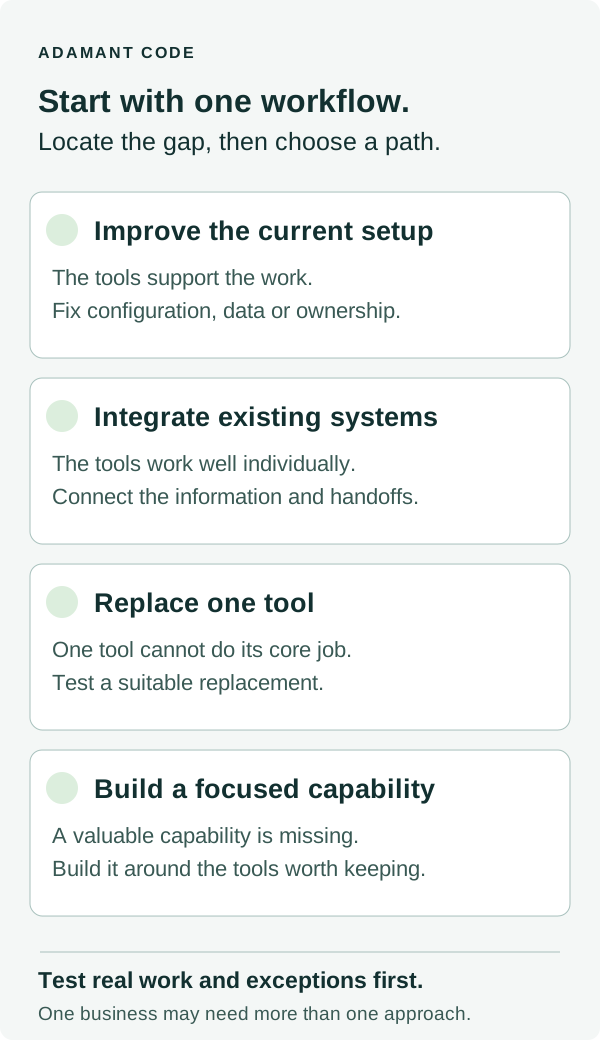
| Approach | A good fit when | Check before committing |
|---|---|---|
| Improve the current setup | The tools already support the work, but configuration, data or responsibilities are inconsistent. | Can a process or configuration change remove the bottleneck without adding software? |
| Integrate existing systems | The tools work well individually, but people move information or coordinate handoffs manually. | Can the systems expose the required data and actions? Which system owns each record? |
| Replace one tool | A standard workflow is poorly served by one application and a suitable product covers the requirement. | Does it handle real exceptions, permissions, exports and migration, as well as the normal path? |
| Build a focused capability | An important workflow requires rules, interactions or controls that available tools cannot support adequately. | Is the missing capability valuable enough to justify development, ownership and ongoing maintenance? |
Integrate when the gap sits between tools
Business systems integration is a strong candidate when the same event should trigger predictable changes elsewhere. An approved quote might create a project. A completed job might prepare an invoice. An updated customer record might need to reach several applications.
The real requirement is more specific than “connect our CRM to our project tool.” Decide which record takes priority, what counts as a valid update and what happens when a system is unavailable. A connection that silently loses work creates a different manual problem.
For example, Stripe documents that webhook events are not guaranteed to arrive in order, and its guidance covers handling duplicate events. This is one concrete reason to test missed, repeated and delayed updates rather than only a successful transfer.
An existing connector may cover everything you need. Custom integration becomes relevant when the available connector cannot support your business rules, exception handling or required actions.
Replace a tool when it cannot do its core job
If an application is unsuitable for the work it is meant to handle, building around it can preserve the wrong constraint. A scheduling tool that cannot represent the resources you allocate may remain difficult to use even after several integrations.
Give a potential replacement three real examples, including a difficult exception. Ask the vendor or implementation partner to demonstrate them using representative data. Include the person who does the work and the person responsible when something goes wrong.
Check migration as carefully as features. You need to know which records, attachments and history can move, what needs cleaning and whether you can export your information again later. The subscription is only part of the decision.
Build custom software when the missing capability matters
Custom business software is worth considering when a consequential workflow needs behavior that standard products cannot provide without persistent workarounds. That might involve unusual approval rules, a customer portal spanning several systems or an internal application that brings information and actions into one place.
Be precise about the missing capability. “Our business is unique” is not a sufficient reason to rebuild customer management, billing and reporting from scratch. Write down what users need to do, why existing products cannot support it and what consequence that gap has for the business.
A custom application can coexist with standard software. When an existing application needs changing, a gradual approach may also be possible. Microsoft describes an incremental replacement pattern that can reduce disruption while moving capabilities into a new system. Whether that approach fits depends on the application's boundaries and dependencies.
Three workflows, three different decisions
The following examples are illustrative. They are not Adamant client results.
A signed deal gets retyped into the project system
A service business uses a CRM that sales likes and a project tool that delivery likes. After a deal closes, someone copies the customer, scope and agreed start date into the project tool, then sends a handoff email.
First option to investigate. Connect the existing tools. The missing capability is the transfer and handoff, not a new CRM.
Validate one closed deal, one later change and one cancelled deal. Decide who resolves missing information and how people know the transfer failed. If the tools cannot expose the necessary actions, compare a different connector, a custom integration or replacement of the limiting tool.
A scheduling tool cannot represent the resources being booked
An established business schedules appointments that require both a trained employee and a particular room or piece of equipment. Its current tool only reserves employee time, so the operations team maintains a second calendar to avoid conflicts.
First option to investigate. A replacement scheduling product that supports those resources together. The limitation sits inside the tool's core job.
Test rescheduling, cancellations and shared resources before migrating. If those requirements are standard and a product handles them well, a custom scheduling system may add unnecessary ownership.
Customer approvals span several systems and business rules
A business serves customers whose requests move through several approval stages. Different people may approve different changes, and the next action depends on the contract and current project state. Employees coordinate the process through email because no existing interface shows the whole request.
First option to investigate. A focused portal or internal workflow application that connects to the existing records. Simple data synchronization would not resolve the missing approval experience.
Start with one request type. Keep the existing customer and accounting records where they belong. Define the approval rules, visible history and route for exceptional cases before expanding to other requests.
Compare the full cost, including who keeps it working
A software quote and a subscription price are rarely comparable on their own. Evaluate the same workflow and level of responsibility across each option.
- Getting started. Include configuration, development, migration, data cleanup, testing and training.
- Running the system. Include subscriptions, hosting, usage charges, maintenance and someone checking that the workflow still works.
- Making changes. Consider new business rules, vendor changes and the effort needed to modify integrations.
- Recovering from failure. Identify who receives an alert, who can correct the problem and how missed work is recovered.
- Moving on later. Check data exports, documentation, account ownership and the ability to transfer support.
Describe the cost of the current process with equal care. Count how often the work happens, how long it takes and the exceptions that cause rework. Keep measured figures separate from estimates.
Time released is capacity, not automatically cash savings. Removing several hours of admin only creates a direct financial saving if something changes in staffing, overtime or external spending. It may still be valuable because employees can serve more customers or finish work sooner, but that is a different claim to test.
For an existing application that still carries useful business logic, our software assessment and improvement approach considers what to retain, repair or rebuild.
Agree who owns the workflow internally. An integration still needs an owner when a vendor changes a field. Vendor documentation makes those responsibilities concrete. For example, Stripe documents duplicate webhook deliveries and event ordering, which an integration using those events must handle. A custom application still needs maintenance after launch. Buying software does not remove the need for operating responsibility.
Choose one useful improvement before expanding the scope
Choose a workflow that happens repeatedly, has an owner and can be observed from start to finish. Prefer one where you can tell whether the change helped without waiting for a company-wide transformation.
A first release should complete useful work. For example, transferring a confirmed order, checking required fields and routing exceptions to an owner is a more testable boundary than “automate operations.” Include failure handling in that boundary.
Use this short brief with the people involved.
- Trigger. What starts the work?
- Outcome. What must be true when it finishes?
- Systems and records. Where does information come from, and which source wins when records disagree?
- Decisions and exceptions. What rules apply, and when does a person take over?
- Owner and measure. Who is responsible, and what will show an improvement?
- First boundary. Which case will you support first, and which cases will remain manual?
Download the workflow decision worksheet. It includes a blank brief and an illustrative handoff example. You can open it in a spreadsheet and use it without submitting an email address.
If a decision rests on an unknown, investigate that specific question. Check whether the required data is accessible. Test the difficult approval rule. Try the proposed tool with a real exception. Clear work may be ready to scope immediately. Broader uncertainty may justify a bounded planning engagement before committing to development.
Where does AI fit into business process automation?
AI may help when the workflow involves interpreting documents, finding relevant information or drafting an answer for review. It does not need to be the foundation of every automation. A predictable record transfer may only need an integration and clear rules.
At TCE, the useful problem was finding information in large engineering documents and checking the evidence behind an answer. We built search that returns source citations, page references, exact paragraphs and highlighted sources. Engineer interviews and client estimates indicate an estimated 83% reduction in document-search time. This was not measured through formal usage logs or a controlled pilot. Read the TCE case study.
A separate anonymous internal operations platform supports 44 internal users, 400+ connected properties and around 220k rows per day on average. Those figures describe platform scale, not measured savings. The work developed through a two-year relationship with a repeat client.
The common decision is what the business needs to do reliably. AI, integration and custom interfaces are possible components of that answer.
Common questions about buying or building business software
Is custom software better than off-the-shelf software?
It depends on the workflow. Off-the-shelf software is a strong option when it supports your important requirements and exceptions. Custom software becomes more compelling when a valuable capability is missing and the business can support its development and ongoing ownership.
Can we automate work without replacing our existing systems?
Often, if those systems provide suitable connectors, APIs, exports or other approved access. Confirm the required actions, data quality and exception handling before choosing an integration approach.
Should we replace our spreadsheets with a custom application?
Consider who edits the data, how mistakes are detected and what depends on the result. A spreadsheet may be adequate for a small, well-owned process. Shared approvals, complicated permissions, repeated errors or critical dependencies may justify a different tool or a focused application.
What should we bring to a software development partner?
Bring a recent example of the work, the systems involved, the person responsible and what needs to improve. A complete specification is not required. A useful partner will help examine the options, explain the trade-offs and identify a sensible first step.
Start with the part of the business that is hardest to keep moving
You do not have to decide whether to buy or build before discussing the problem. Start with one workflow and the point where your current tools fall short.
Adamant helps businesses connect systems and automate recurring work, build custom business software and improve existing applications. We work as your product and technical partner, helping you decide what is worth changing and staying hands-on through implementation.
For an example of a focused operational build, the anonymous internal operations platform brings data, reporting and AI-assisted work together. Its 44 internal users and 400+ connected properties describe platform scale, not measured savings. Use the workflow decision worksheet to identify your own missing capability before deciding whether a similar approach fits.
If the goal is a new product for external users, our product development service covers the first useful release. For an existing business workflow, bring the completed worksheet and the exceptions your current tools cannot handle. We work week by week and agree the next priorities together.